
Paper Types Explained
Compare coated, uncoated, matte, and gloss stocks, including how weight and finish affect the look and feel of a printed piece.
Let's Talk Stock
Crafting print with precision since 1989—trusted by businesses, fueled by innovation, and driven by purpose.
929 W 16th Street,
Indianapolis, IN
317 635 2282
Change names, images, colors, copy, offers, or layouts record by record in one coordinated print and mail run.
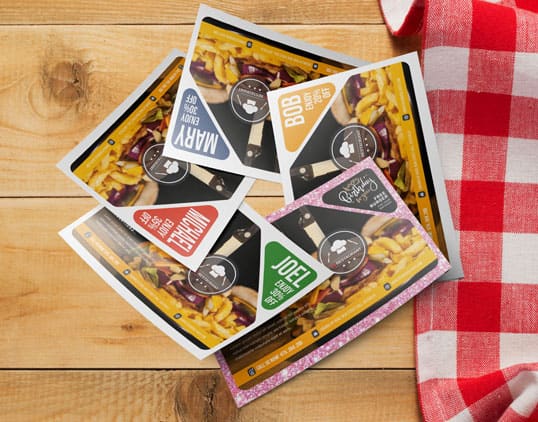
Variable data printing is a digital printing process in which text, images, colors, or entire layouts change from one printed piece to the next within the same run. Data is pulled automatically from a file without stopping the press. It is also called variable information printing.
A fixed design can become many relevant pieces. One record may receive a donor thank-you letter while the next receives a prospecting letter within the same job and mail drop.
A template holds the fixed design, and a data file holds one row per recipient. XMPie matches data columns to marked placeholders in the template. A digital press then renders every unique piece in one continuous run, with no offset plates and no separate print run for each version.
VDP requires a digital toner or inkjet process because each impression can differ. Offset printing uses fixed plates, so it is best when every piece is identical. When you are ready to price a campaign, review our variable data printing service.

Every piece in one mail drop can carry a different version, coded in the data file, as long as every version shares the same physical size and format. Within that constraint, the color scheme, photography, copy, offer, QR code, and entire content layout can change by recipient or segment.
Printing Partners handles data, printing, finishing, and mailing in Indianapolis. One team stays accountable instead of moving files and pieces between separate vendors. See our print and mail services for the full production path.
| Data field in your file | What it can change on the piece | Example |
|---|---|---|
| Name or greeting column | Greeting line and address block | Dear Maria, instead of Dear Friend, |
| Segment or LetterType column | The entire letter or layout | A donor thank-you letter and a cold prospecting letter from the same template set |
| Photo or Image ID column | Which photo or product image appears | Each audience segment sees the photograph selected for that segment |
| Color scheme column | Background color or accent palette | One segment receives blue accents while another receives orange accents |
| Offer or ask-amount column | Headline, callout box, or amount shown | A first-time donor sees a $25 ask while another segment sees a different amount |
| Neighborhood or territory column | Local reference copy in the body | A real estate postcard names the recipient's neighborhood and nearby activity |
| QR code or URL column | A unique QR code or personalized URL | Each event invitee's code opens that person's confirmation page |
Static, versioned, and variable data printing are three levels of message variation. Static printing repeats one design for everyone. Versioned printing assigns a few fixed designs to audience groups. Variable data printing can change marked elements for each record. The right choice depends on how many distinct messages the list needs.
| Decision | Static offset printing | Versioned printing | Variable data printing |
|---|---|---|---|
| What changes per piece | Nothing, every piece is identical | A handful of fixed alternate versions, applied to whole segments | Any marked field can be unique, including text, image, color, offer, or layout |
| Setup cost | Higher upfront plate and makeready cost, spread across a large run | Moderate, with a separate setup for each version | One-time data file and template setup, with no per-version plate cost |
| Personalization depth | None | Segment level, often 2 to 4 versions | Record level, up to one version per person |
| Best for | One message for the entire list | A short list of audience groups that each need one alternate design | A message that should match the individual or that person's segment |
In this illustrative donor campaign, one spreadsheet controls four letter versions, four photographs, four ask amounts, and four accent colors. Each row carries the instructions for one recipient. All four records produce the same physical piece size and format, then enter the same coordinated mail drop after printing.
| Record | Donor tier | Letter version | Photo | Offer or ask | Color accent |
|---|---|---|---|---|---|
| Maria | New donor | Welcome letter | Volunteer in action | $25 first gift | Blue |
| James | Recurring donor | Thank-you and renewal | Program impact | $50 renewal | Green |
| Patricia | Lapsed donor | Win-back letter | Return-focused image | $35 return gift | Orange |
| Robert | Major donor | Upgrade ask | Board event | $250 upgrade | Gold |
Versioning changes the message, not the production footprint. The pieces share their size, paper, and press setup while the data chooses what each recipient sees.
Mark every field that should vary with <<Database Column Name>> in the design file. Supply a matching spreadsheet in which each column header matches a placeholder exactly and each row represents one recipient. A clear template, clean data, and consistent image rules make the merge predictable.
The live example shows merge tags in the actual letter layout, including the recipient name, donation amount, donation date, and custom URL.
Download Sample Variable CSV to see a simple two-record structure.
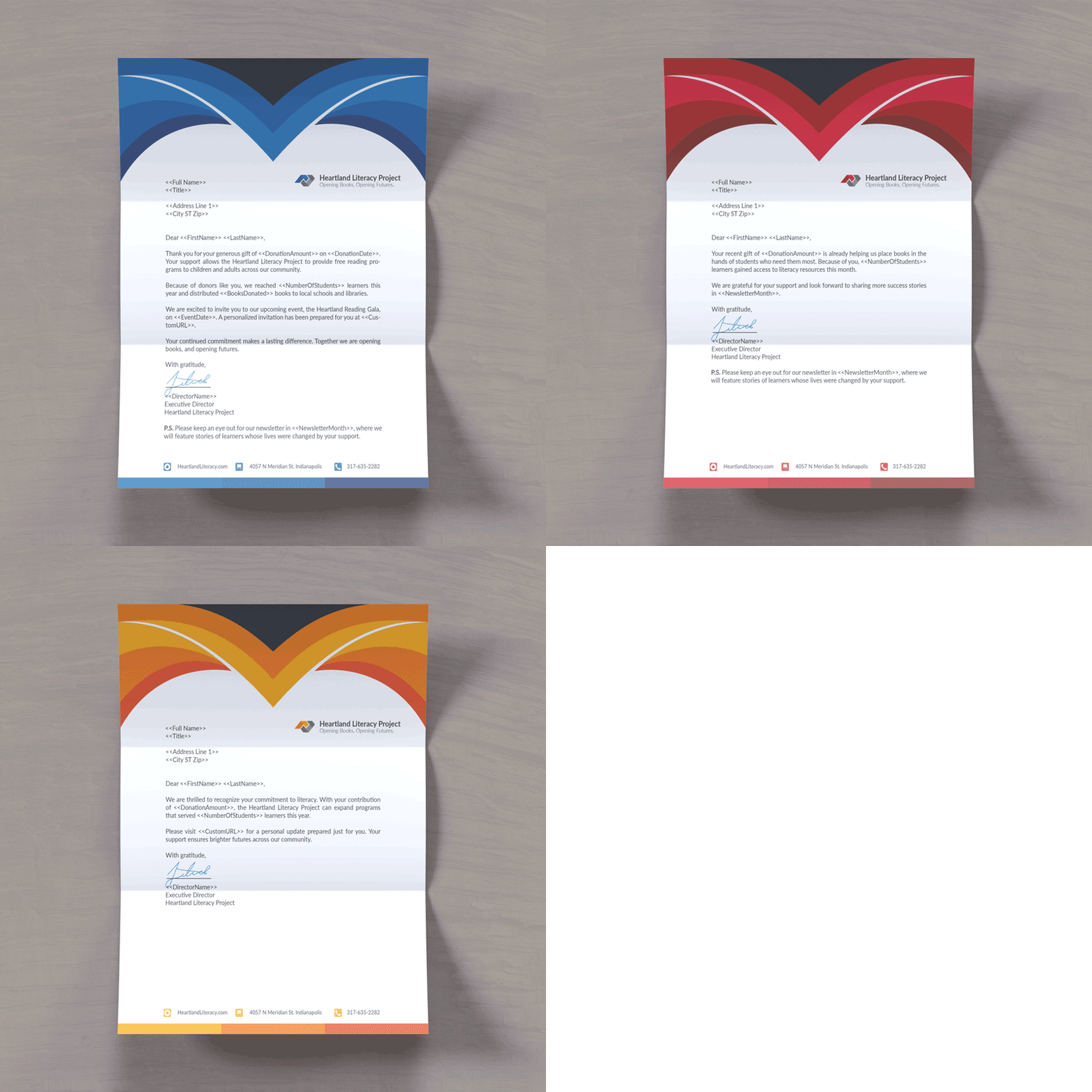
A packaged InDesign file is preferred, although common design formats can be reviewed. Mark each changing element with its matching database column.
Add a LetterType column and label each record with its version. That field can select a complete thank-you, renewal, win-back, or prospecting letter.
Supply CMYK JPEG files at 300 dpi and 100% size. Keep every replacement image at the same physical size and placement. Use EPS for vector artwork.
Allow room for realistic long values. Printing Partners scales an overlong name horizontally to fit rather than truncating it or adding ellipses.
Short copy can live in spreadsheet cells. For long paragraphs, supply one plain .txt file per variation instead of .doc files.
Use CSV or Excel, match each column header to its placeholder, keep one recipient per row, and format fields consistently.
Start with an Excel, CSV, or delimited text file containing one row per recipient. Printing Partners reviews the file for duplicate records, missing required fields, inconsistent column headers, and record count against the ordered quantity. For mailed campaigns, list hygiene and postal preparation continue in the same facility.
For communication and marketing mail, CASS and NCOA list work, presort, and Intelligent Mail barcode preparation are handled in-house. The direct mail services page explains the mailing workflow.
Variable data printing makes direct mail more relevant by matching the message to the recipient's situation instead of sending one generic piece to the entire list. A current donor can receive a thank-you while a prospect receives an introduction. Printing, sorting, and mailing stay under one roof.
Response depends on the list, offer, creative, timing, and audience, so this guide does not claim an unsupported lift. The practical benefit is control: marketers can align each segment's image, copy, and ask without managing separate print jobs or mail drops.
These answers cover the questions print buyers ask before preparing a variable data job: what VDP means, how the merge works, which printing process supports it, how files should be built, which elements can change, and when versioned printing is sufficient. Each answer stands on its own for quick reference.
Variable data printing is a digital printing process that lets text, images, colors, or entire layouts change from one printed piece to the next within a single run, using information pulled automatically from a data file. Also called variable information printing, it produces personalized pieces without stopping the press between versions.
In printing, variable data refers to any element in a design marked to pull from a database column instead of staying fixed, such as a name, an offer amount, a photo, or a color. Each record in the data file supplies its own value, so every printed piece can be different.
A fixed template holds the parts of the design that do not change. A data file supplies one row per recipient. Software matches each data column to a marked placeholder in the template, and a digital press renders every unique record at full production speed, all in one continuous run.
Digital printing, not offset, prints variable data. Digital toner or inkjet presses can change what they print on every impression, which personalization requires. Offset printing uses a fixed plate for the whole run, so every piece is identical and cannot support record-level variation without separate versions.
Mark every element that should vary with a placeholder, such as <<First Name>>, directly in your design file. Supply a matching CSV or Excel file where each column header matches a placeholder exactly and each row is one recipient. Replacement photos must share one size and placement rule.
Examples include a donor mailing where new, recurring, and lapsed donors receive different letters; a postcard run where each recipient's name, offer, and accent color change; and an event invitation where every attendee receives a unique QR code linked to that person's confirmation page.
Variable data printing makes a piece more relevant by matching its message to the recipient instead of sending one generic design to the whole list. A past donor can receive a thank-you, while a prospect receives an introduction. Actual response still depends on the list, offer, creative, and timing.
Versioned printing produces a handful of fixed alternate designs, one for each audience segment. Variable data printing goes further because every individual record can be unique, not just every segment. The data file can control marked text, images, colors, offers, QR codes, and complete layouts within one run.
Use CSV, Excel, or a delimited text file, with one row per recipient and column headers that match the placeholders in the design file exactly. Long variable paragraphs may need separate plain text files rather than spreadsheet cells. Printing Partners reviews the structure before production begins.
Yes. Any marked element mapped to a data column can vary, including photos, color schemes, offers, QR codes, and complete layout blocks, not only text. Every version must share the same physical size and format so all pieces can run through the same coordinated print, finishing, and mailing setup.
Send the finished piece size, quantity, design file, sample data columns, and whether Printing Partners will mail the job. The team can review how many versions you need, which fields should vary, and whether your current file structure supports the campaign before preparing a project-specific quote.
Printing Partners
929 W 16th Street
Indianapolis, IN 46202
Family owned in Indianapolis since 1989. Data work, digital printing, finishing, and mailing are coordinated under one roof.
Variable data is one part of a production-ready print file. Use these Printing Partners resources to compare coated and uncoated paper, choose a binding method for multi-page pieces, and calculate panel dimensions for folded work. Each guide addresses a separate decision that can affect design, production, or mailing.
Compare coated, uncoated, matte, and gloss stocks, including how weight and finish affect the look and feel of a printed piece.
Let's Talk StockCompare binding methods for booklets, catalogs, and publications, including how each option opens and holds together.
Hold It TogetherCalculate panel sizes for common fold styles so artwork lines up correctly before the piece enters production.
Unfold the Secrets