A Family Owned Business For Over 36 Years

Crafting print with precision since 1989—trusted by businesses, fueled by innovation, and driven by purpose.

Contact Us
  • 929 W 16th Street,
    Indianapolis, IN

  • 317 635 2282

.

Perfect Bound Spine Calculator

Perfect Bound Spine Calculator

Getting a book ready for press? We print, bind, and mail perfect bound books under one roof in Indianapolis.

Request a print estimate

Perfect Bound Spine Width Calculator

Enter your page count and interior paper to calculate spine width. Add a trim size to see the full cover spread, hinge lines, and document setup. Nothing is stored.

Page count

One sheet is 2 pages. Perfect bound books need an even page count.

Cover weight does not change the spine. We record it for your spec sheet only.

Start here. Two fields get you a spine.

  1. Page count Every sheet holds 2 pages, so we halve it. Use your final count, even.
  2. Interior paper Thickness, not weight, sets the spine. Pick your stock or type a caliper.
  3. Trim size (optional) Add it for the full cover spread, hinge lines, and InDesign setup.
BACK FRONT SPINE hatched = hinge keep-clear

This is what we will draw to scale once you enter your numbers.

How do you calculate the spine width of a perfect bound book?

Divide the page count by 2 to get the number of sheets, then multiply by the paper’s caliper. A 200-page book on 0.0052″ caliper text stock has a spine of 100 x 0.0052″ = 0.520″. Printing Partners adds no glue or cover allowance to that number.

Spine Width = (Page Count ÷ 2) × Paper Caliper

The page count is divided in half because every sheet of paper carries two pages, one on each side. Some printers add an allowance for adhesive or cover thickness. We do not. Our covers wrap the finished text block, so the spine is the measured bulk of the interior sheets and nothing more.

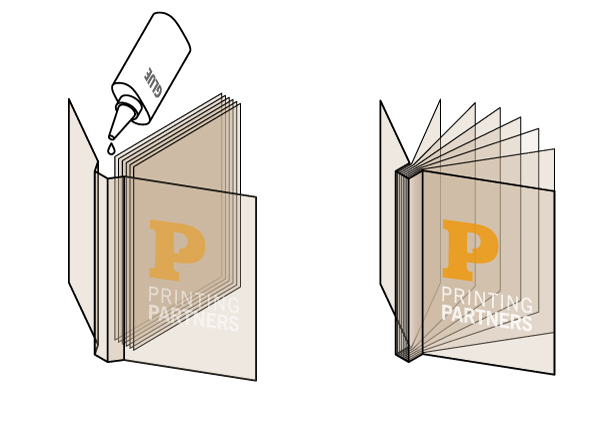
Perfect bound binding diagram: adhesive is applied to the spine edge of the stacked text block, then the cover is wrapped around the block to form the finished paperback.
Perfect binding in two steps. Adhesive is applied to the milled spine edge of the text block, then the cover wraps around it. Because the cover wraps a block that is already the full spine thickness, cover weight is not added to the spine measurement.

Every caliper in the stock table above comes from the paper mill’s own published spec sheet, linked on each row.

What is paper caliper, and why does it matter more than paper weight?

Caliper is the thickness of a single sheet, measured in thousandths of an inch. Basis weight does not reliably predict it. Our 80# Anthem Plus Gloss Text measures 0.0037″, which is thinner than our 50# Husky Offset at 0.0039″. Always calculate a spine from caliper, never from weight.

That example is worth sitting with, because it breaks the intuition most people bring to paper. A sheet more than half again the basis weight is physically thinner, because coated stock is compressed and calendered during manufacturing. Pick a spine number off a weight chart and you can be wrong by an eighth of an inch across a 300-page book.

Book manufacturers sometimes quote pages per inch (PPI) instead of caliper. The two convert directly: PPI = 2 ÷ caliper. A 0.0052″ sheet is 385 PPI. Our calculator and stock table both use caliper, since that is what our mills publish.

What are hinge lines, and how do you design around them?

Hinge lines are scores pressed into the cover about 3/16″ to 1/4″ from each side of the spine, letting the cover open without cracking the glue. Design around them: keep critical text and logos outside the zone, though images may bleed about 1/32″ into it. The calculator above plots their exact positions.

A perfect bound cover gets four creases in total: two spine folds and two hinge scores, one on each cover. Without the hinge score, the cover fights the glue every time the book opens, and a laminated or heavily inked cover will crack along the spine edge within a few openings.

A perfect bound paperback lying open on a table, showing the flat glued spine and the squared text block.
Hinge scores let the cover lay back like this instead of fighting the adhesive. The flat, squared spine is what makes perfect binding printable on the spine.

What should stay out of the hinge area?

On the outside cover, keep type, logos, faces, and fine detail clear of the hinge zone. The score presses a visible indentation into the sheet and will distort anything crossing it. Images and background color may bleed about 1/32″ in, so a photo running across the spine will not show a white gap.

On the inside cover, leave the spine and hinge area free of heavy ink coverage. That strip is where the side glue grabs the paper, and adhesive bonds to bare stock far better than it bonds to a solid ink layer.

How many pages do you need for perfect binding?

There is no fixed page minimum. Perfect binding is limited by block thickness, not page count. Our Horizon BQ-470 binds blocks from 0.015″ to 2.560″ thick. In practice, books with spines under about 1/8″ usually open and read better saddle stitched, so ask us which method suits your job.

Because the limit is thickness, the page count that gets you there depends entirely on your paper. On 70# Lynx Opaque Text, a 1/8″ spine arrives at about 48 pages. On thinner 80# Anthem Plus Gloss Text, the same spine takes roughly 68 pages. This is the same caliper point again: the paper decides, not the page count.

What is the maximum page count for a perfect bound book?

Our binder’s 2.560″ maximum works out to roughly 984 pages on 70# Lynx Opaque Text, or about 1,312 pages on 50# Husky Offset. Heavier paper means fewer pages. Past that thickness, a title is normally split into two volumes.

How do you set up a perfect bound cover document?

Build the cover as one flat spread rather than separate pages, ordered back cover, spine, front cover, left to right. For a 6 x 9 book with a 0.520″ spine, that is a 12.520″ x 9″ document, or 12.770″ x 9.250″ once you add bleed.

  1. Calculate the spine from your final page count and interior caliper. Wait until the page count is locked, because one signature changes the spine and every guide on the cover.
  2. Create one page at spread size: (trim width x 2) + spine wide, by trim height tall. Set bleed to 0.125″ on all four sides.
  3. Place vertical guides at both spine folds and both hinge scores. The calculator above lists all four positions measured from the left trim edge, ready to type into InDesign.
  4. Keep critical content 0.125″ inside the trim and outside the hinge zones. On the inside cover, leave the spine and hinge free of heavy ink for the glue.
  5. Export a press-ready PDF with bleed and crop marks. See our PDF export guide for print for settings.

Spine width by page count

Spine widths for three stocks we run, calculated with the formula above. Note how the 80# coated sheet produces a narrower spine than the 50# uncoated at every page count. Use the calculator for your exact stock.

Pages 50# Husky Offset
0.0039″
80# Anthem Plus Gloss Text
0.0037″
70# Lynx Opaque Text
0.0052″
480.094″ (2.4 mm)0.089″ (2.3 mm)0.125″ (3.2 mm)
640.125″ (3.2 mm)0.118″ (3.0 mm)0.166″ (4.2 mm)
960.187″ (4.8 mm)0.178″ (4.5 mm)0.250″ (6.3 mm)
1280.250″ (6.3 mm)0.237″ (6.0 mm)0.333″ (8.5 mm)
2000.390″ (9.9 mm)0.370″ (9.4 mm)0.520″ (13.2 mm)
3000.585″ (14.9 mm)0.555″ (14.1 mm)0.780″ (19.8 mm)
4000.780″ (19.8 mm)0.740″ (18.8 mm)1.040″ (26.4 mm)

Your spine is figured out. Let us print the book.

You are at the end of file prep, which is when the printer matters most. We run offset and digital, perfect bind, and mail from one building in Indianapolis, so nobody hands your book to a third party and hopes.

  • Family owned
  • Printed and bound in the USA
  • Bindery and mailing in house
  • Prepress checks your file first
Request a print estimate

Perfect Binding Spine Questions

Does the cover stock add to the spine width?

No. Printing Partners calculates spine width from the interior sheets only, using the formula (page count divided by 2) times the paper caliper. Cover thickness and binding glue are not added to this number. The cover wraps around the finished text block, so its weight does not change the spine measurement.

Does paper weight affect the spine width?

Not directly. Spine width depends on caliper, the measured thickness of one sheet in thousandths of an inch, not on basis weight. Two papers with the same weight can have different calipers, so a 70# gloss and a 70# uncoated sheet can produce different spines. Always calculate from caliper.

What are hinge lines, and where do they go on a perfect bound cover?

Hinge lines are two scores pressed into the cover, one on each side of the spine, so it can open without cracking the glue. On our covers they sit about 3/16 inch to 1/4 inch from each spine edge. Keep critical text and logos out of this zone, though images may bleed in about 1/32 inch.

What happens if the spine width is wrong?

If the spine is too narrow or too wide, artwork and type meant for the spine can wrap onto the front or back cover, and background colors can show a gap at the fold. This is why we ask for a final, even page count and exact paper stock before you design the cover.

Why does the calculator use sheets instead of pages?

Spine width comes from the physical stack of paper, and each sheet holds two pages, one on the front and one on the back. So 100 pages equals 50 sheets. The calculator divides your page count by two, then multiplies by caliper. Perfect bound books need an even page count.

Can I use this calculator for hardcover or saddle stitched books?

No. This calculator is for perfect bound, or adhesive, paperbacks only. Hardcover, or case bound, books add board and endsheet thickness that changes the measurement. Saddle stitched booklets are folded and stapled, so they have no flat spine to print on. Contact us for specs on those binding styles.

How accurate is this spine calculator?

The calculator uses caliper values taken from the paper mills’ own spec sheets, which are linked in the stock table above, so the estimate is precise for the listed papers. Because paper can vary slightly with humidity and print run, we confirm the final spine with your production rep before printing.


Paper stock caliper reference

Mill-published caliper for the stocks we run, grouped the same way as the calculator above. Caliper is the thickness of one sheet: multiply it by your sheet count to get spine width. Each row links to the paper mill’s own spec sheet where one is published.

Interior text, coated (17)

Paper Weight and DescriptionCaliper (in)Stock BrandSpec Sheet
60# Anthem Plus Gloss Text0.0029AnthemSpec Sheet
70# Anthem Plus Gloss Text0.0034AnthemSpec Sheet
80# Anthem Plus Gloss Text0.0037AnthemSpec Sheet
100# Anthem Plus Gloss Text0.0048AnthemSpec Sheet
70# Anthem Plus Satin Text0.0039AnthemSpec Sheet
80# Anthem Plus Satin Text0.0044AnthemSpec Sheet
100# Anthem Plus Satin Text0.0055AnthemSpec Sheet
80# Millcraft Blazer Satin Text0.0043BlazerSpec Sheet
100# Blazer Dig Satin Text0.0054BlazerSpec Sheet
80# Blazer Gloss Text Dig0.0037BlazerSpec Sheet
60# Creator Gloss Text0.0029Creatornot published
80# Millcraft Gloss Text0.0037Somersetnot published
60# Sappi Silk Text0.0033EuroArtnot published
60# Flo Matte Text0.0032FloSpec Sheet
70# Flo Matte Text0.0038FloSpec Sheet
80# Flo Matte Text0.0041FloSpec Sheet
100# Flo Matte Text0.0052FloSpec Sheet

Interior text, uncoated & offset (41)

Paper Weight and DescriptionCaliper (in)Stock BrandSpec Sheet
60# Astrobright Text Pulsar Pink Dig0.0047AstrobrightSpec Sheet
60# Astrobright Text Reentry Red0.0047AstrobrightSpec Sheet
60# Astro Text Cosmic Orange Dig0.0047AstrobrightSpec Sheet
60# Astrobright Text Celestial Blue0.0047AstrobrightSpec Sheet
60# Astrobright Text Planetary Purple Dig0.0047AstrobrightSpec Sheet
60# Astrobright Text Sunburst Yellow0.0047AstrobrightSpec Sheet
60# Astrobright Text Martian Green0.0047AstrobrightSpec Sheet
60# Astrobright Text Orbit Orange0.0047AstrobrightSpec Sheet
60# Earthchoice Opaque Text Tan Dig0.0048Domtar ColorsSpec Sheet
60# Earthchoice Opaque Text Peach Dig0.0048ExactSpec Sheet
60# Earthchoice Opaque Text Blue Dig0.0048Domtar ColorsSpec Sheet
70# Earthchoice Opaque Text Cream0.0057Domtar ColorsSpec Sheet
60# Earthchoice Opaque Text Cream Dig0.0048EarthchoiceSpec Sheet
60# Earthchoice Opaque Text Orchid Dig0.0048ExactSpec Sheet
60# Earthchoice Text Canary Dig0.0048ExactSpec Sheet
20# Earthchoice Text Buff Dig0.0042Domtar ColorsSpec Sheet
20# Earthchoice Multipurpose Text Tan Dig0.0042Exact MultipurposeSpec Sheet
20# Domtar Colors Text Blue Dig0.0042Domtar ColorsSpec Sheet
20# Earthchoice Text Cream Dig0.0042Exact MultipurposeSpec Sheet
60# Earthchoice Text Goldenrod0.0049SpringhillSpec Sheet
70# Royal Linen Natural Text0.0055Royal LinenSpec Sheet
60# Lynx Opaque Text Dig0.0046LynxSpec Sheet
70# Lynx Opaque Text0.0052LynxSpec Sheet
80# Lynx Opaque Text0.0062LynxSpec Sheet
100# Lynx Opaque Text0.0076LynxSpec Sheet
60# Accent Opaque Offset Text0.0046AccentSpec Sheet
50# Husky Offset0.0039HuskySpec Sheet
60# Husky Offset0.0046HuskySpec Sheet
70# Husky Text0.0053HuskySpec Sheet
50# Ideal Smooth White Text0.0038Idealnot published
60# Ideal Smooth White Text0.0046Idealnot published
50# Paperfect Opaque Offset0.0040Paperfectnot published
60# Omnilux Opaque Offset0.0046OmniluxSpec Sheet
50# Finch Offset Text0.0040FinchSpec Sheet
50# Rolland Opaque Text0.0039Rolland Opaquenot published
60# Rolland Opaque Text0.0044Rolland Opaquenot published
8pt Spectro C2S0.0080SpectroSpec Sheet
10pt Spectro C2S0.0100SpectroSpec Sheet
12pt Spectro C2S0.0120SpectroSpec Sheet
10pt Kallima C2S0.0100NordicOverview
10pt Productolith C2S0.0100ProductolithSpec Sheet

Cover stocks (28)

Paper Weight and DescriptionCaliper (in)Stock BrandSpec Sheet
80# Anthem Plus Gloss Cover0.0074AnthemSpec Sheet
100# Anthem Plus Gloss Cover0.0092AnthemSpec Sheet
80# Anthem Plus Satin Cover0.0093AnthemSpec Sheet
100# Anthem Plus Satin Cover0.0113AnthemSpec Sheet
80# Blazer Dig Satin Cover0.0093BlazerSpec Sheet
100# Blazer Dig Satin Cover0.0103BlazerSpec Sheet
80# Blazer Dig Gloss Cover0.0074BlazerSpec Sheet
100# Blazer Gloss Cover Dig0.0093BlazerSpec Sheet
67# Springhill Vellum Bristol Tan Dig0.0076ExactSpec Sheet
67# Domtar Vellum Bristol Blue Dig0.0076DomtarSpec Sheet
67# Springhill Vellum Bristol Gold Dig0.0076DomtarSpec Sheet
67# Earthchoice Vellum Bristol Gray Dig0.0076DomtarSpec Sheet
67# Springhill Vellum Bristol Pink Dig0.0076ExactSpec Sheet
67# Vellum Bristol Cream Dig0.0076ExactSpec Sheet
67# Domtar Vellum Bristol Green Dig0.0076ExactSpec Sheet
67# Springhill Vellum Bristol Ivory Dig0.0076EarthchoiceSpec Sheet
67# Springhill Vellum Bristol White Dig0.0076ExactSpec Sheet
67# Springhill Vellum Bristol Orchid Dig0.0076ExactSpec Sheet
67# Domtar Bristol Canary Dig0.0076EarthchoiceSpec Sheet
67# Vellum Bristol Peach Dig0.0076ExactSpec Sheet
65# Lynx Opaque Cover Dig0.0086LynxSpec Sheet
80# Lynx Opaque Cover0.0112LynxSpec Sheet
100# Lynx Opaque Smooth Cover0.0139LynxSpec Sheet
65# Flo Matte Cover0.0070FloSpec Sheet
80# Flo Matte Cover0.0094FloSpec Sheet
100# Flo Dull Cover0.0097FloSpec Sheet
120# Flo Gloss Cover0.0115FloSpec Sheet
120# Endurance Dull Cover0.0134Endurancenot published

Specialty / label (C1S) (6)

Paper Weight and DescriptionCaliper (in)Stock BrandSpec Sheet
70# Lustercote Litho Label C1S0.0037LustercoteSpec Sheet
80# Midland Emb Linen Litho C1S0.0043Linen Lithonot published
10pt Spectro C1S0.0100SpectroSpec Sheet
12pt Spectro C1S0.0120SpectroSpec Sheet
12pt Kallima C1S0.0120NordicOverview
12pt C1S Proto Litho Cover0.0120ProductolithSpec Sheet

Last updated July 15, 2026 · Maintained by Kraig Downham, Marketing Director, Printing Partners · Spine and hinge specifications verified against our Horizon BQ-470 perfect binder and current mill spec sheets.

A collection of assorted stationery items including folders, notepads, and business cards in various colors.
Various packaging designs featuring characters named Martha, Toni, and Robin in different colors and styles.
A blue circular graphic element with a soft gradient and a textured border.
Abstract white zigzag pattern on a black background, creating a dynamic visual effect.

Are You Getting The
Best Price?

Request An Estimate